
Austin News from KVUE
TEGNANews & Magazines
4.2668.00 Reviews
- Version
- 50.23.2
- Installs
- 100.00K
- Age Rating
- Everyone
Screenshots




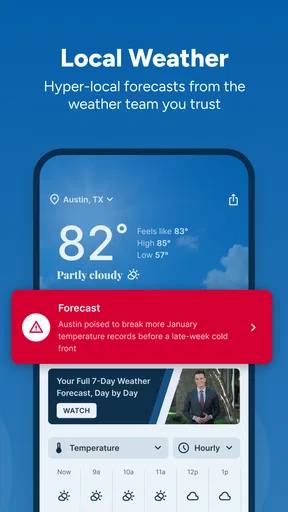


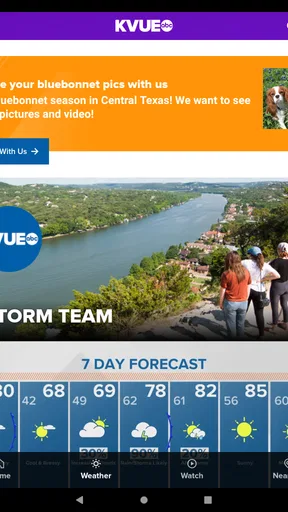
Our Review of Austin News from KVUE
 Analysis by Appyee
When I want a quick sense of what is happening around Austin, I would rather open a focused local news app than sort through a national feed filled with stories that have little effect on my day. Austin News from KVUE is built for that narrower purpose. It brings together Central Texas reporting, weather and traffic coverage in one place, and that focus is the main reason I find it useful.
This is a free news and magazines app from TEGNA, with an Everyone age rating and support for devices running OS 7.1 or later. Its current version is 50.23.2, and the app has been available since December 17, 2010. Those details matter less than the everyday experience, but they show that this is an established local-news product rather than a newly launched experiment.
My overall impression is positive, especially if your routine depends on Austin-area conditions. The app has a 4.2 average from around two thousand ratings and has passed one hundred thousand installs. I would not treat those figures as a guarantee that every reader will enjoy it, though. The value depends heavily on whether you want local coverage first, rather than a broad news reader with extensive national customization.
Why the local focus makes a difference
I find Austin’s local focus useful because it helps me decide which information deserves attention before I reach for a specialist tool. In this section, I look at how that regional perspective can make a quick check more practical, especially when a headline, weather concern and travel plan intersect.
One place for the information that changes a normal day
The strongest capability here is not simply showing headlines. It is the combination of Central Texas news, weather and traffic in a single local destination. That mix is more practical than it may sound. A story about a road closure, a developing weather situation or an issue affecting a nearby community can matter immediately, while a national headline can wait until later.
I see the app as a decision-making tool rather than a complete replacement for every source of information. Before leaving home, I can use it to check whether the day’s conditions deserve extra planning. During a busy afternoon, I can look for local developments without opening several unrelated apps. In the evening, it gives me a way to catch up on Austin-area events without wading through a general-purpose feed.
That local concentration also changes how I judge the app. A national aggregator may offer more subjects, more opinions and a larger range of publishers, but it can make nearby information harder to find. Austin News from KVUE takes the opposite approach: it gives regional relevance priority. For residents, commuters and people with family or work ties in Central Texas, that can save time even when the app itself remains simple.
What I would use it for first
I would start with the weather and traffic portions because they have the clearest immediate effect. If I am deciding whether to leave earlier, change a route or postpone an outdoor plan, those sections are more useful than a long list of general headlines. The news side then adds context: instead of seeing a disruption as an isolated inconvenience, I can understand the local story behind it.
That relationship between the three subjects is the app’s most meaningful strength. Weather can influence traffic, traffic can affect a local event, and a local event can explain why a particular area is unusually busy. A separate weather app may be stronger for detailed forecasting, and a dedicated navigation service may be better for turn-by-turn decisions, but this app gives me a convenient local overview before I move to those specialized tools.
I also appreciate that the app is not trying to be a social network or an entertainment feed. The purpose is clear. I open it when I want information about Austin and the surrounding Central Texas area, not when I want endless scrolling. That makes it easier to build into a short routine: check the local situation, read the items that affect me, then close the app.
How the experience fits into a busy routine
A realistic use case would be a weekday morning when I have an appointment across town. I would open the app while getting ready, look at the latest local headlines, check the weather, and then review traffic conditions before choosing when to leave. If something important is developing, I have a reason to adjust my plans. If nothing affects my route or schedule, I can move on without spending ten minutes browsing unrelated news.
The same workflow works before an evening activity. Suppose I am meeting friends outdoors or driving to another part of the area. A quick local check can tell me whether conditions deserve attention. The benefit is not that the app eliminates uncertainty; no news app can do that. The benefit is that it puts the most relevant local subjects together, reducing the number of places I need to consult.
One tip I would give new users is to treat the app as a first check, not the only check for high-stakes travel or severe conditions. For ordinary planning, its combined local coverage is convenient. For a long trip, an urgent weather decision or precise navigation, I would still use a dedicated service alongside it. That is not a flaw unique to this app; it is the natural trade-off of choosing one local news tool that covers several needs at once.
Where it stands beside familiar alternatives
Compared with a broad news aggregator, this app feels more relevant when the question is “What is happening near me?” rather than “What is happening everywhere?” Aggregators are useful when I want several viewpoints, international coverage or extensive topic controls. They can also be better for following a subject over a long period. Austin News from KVUE is more direct when the geographic filter matters most.
Compared with a weather-only application, the KVUE app offers more context around local developments. A weather specialist may provide deeper forecasting tools, while this app connects weather with community news and traffic. Compared with a navigation application, it is better for understanding a developing local situation than for guiding every turn. I would not replace those specialized tools entirely, but I would use this one before them when I need a quick regional picture.
The comparison with television news is also interesting. A broadcast can be useful when I want a guided presentation, but an app suits the moments when I cannot watch a full segment. I can check information on my own schedule and focus on the subjects relevant to my day. That flexibility is especially helpful for people who work irregular hours or do not want their news routine tied to a program schedule.
The small habits that make it more useful
The first useful habit is to open it at natural decision points instead of constantly refreshing it. Checking before a commute, before an outdoor plan and after a major local disruption gives the app a clear role. Constant checking can turn any news app into a distraction, while occasional purposeful checks keep the information useful.
The second is to read beyond the first headline when a story affects a plan. A short headline may tell me that something is happening, but the surrounding details can change how I respond. This is particularly important for traffic and weather, where the location and timing matter more than the headline alone.
The third is to pair the app with a specialized tool only when the situation requires it. I would not open several services for every ordinary morning. I would use the local app to identify whether there is a reason to investigate further, then switch to navigation or detailed weather information if needed. That two-step workflow keeps the app valuable without asking it to do a specialist’s job.
Where the convenience has limits
The same local focus that makes the app efficient can make it feel narrow to some readers. If I want international reporting, extensive business coverage, deep technology news or a wide selection of editorial voices, I would choose a broader news application. This app is most convincing when Austin and Central Texas are the center of my attention.
There is also a natural limit to combining news, weather and traffic. Bringing several subjects together is convenient, but it does not mean each area will match the depth of a dedicated service. Someone who plans a complex road trip may want more detailed routing. Someone monitoring changing weather may prefer a specialist forecast tool. Someone researching a national issue may want a larger publication range.
Another trade-off is that local news can sometimes be more useful at certain times than others. On a quiet day, I may find only a few items that directly affect me, while a busy local day makes the app much more valuable. That changing usefulness is normal for a regional news product, but it is worth understanding before installing it as a primary source for all news.
I also think expectations matter around speed and certainty. A local news app can help me notice a developing situation, but early reports may change as events unfold. I would avoid making an important decision from a single headline. Reading the available context and checking a specialized source when the stakes are high is the sensible approach.
Who will get the most from it
This app is a strong fit for people who live in Austin or elsewhere in Central Texas and want a compact local-news routine. It is also useful for commuters who care about regional traffic, families planning around weather, and people who have moved away but still want an easy connection to Austin-area events. The free price removes the main barrier to trying it, and the Everyone rating makes it suitable for a broad household audience.
I would especially recommend it to someone who currently checks several unrelated sources every morning but mainly wants local information. The app may simplify that routine by putting the relevant categories together. It is also a sensible option for a reader who prefers a local outlet’s coverage over an algorithmically mixed national feed.
On the other hand, I would not make it my first recommendation for someone who wants a single app covering the entire world, follows many specialized subjects, or needs professional-grade forecasting and navigation. A broader news reader or dedicated utility will be a better match in those cases. Installing this app makes sense when local relevance is the priority, not when variety and depth across every subject are more important.
Device support and everyday accessibility
Support for OS 7.1 or later means the app is available to people using older compatible devices as well as newer phones. That is helpful if I want a local-news option without needing the latest hardware. The app’s long availability also suggests it has had time to remain part of the local-news landscape, although longevity alone does not determine whether its current presentation will suit everyone.
Because the app is free, I can test it alongside my existing weather, navigation or national-news tools without committing money. I would spend a few days using it at the times when local information matters most: the morning commute, an afternoon weather change and an evening plan. That trial gives a more honest answer than judging it from a single headline or a quick opening screen.
My recommendation after using it
I recommend Austin News from KVUE to readers who want a practical Austin-area news habit rather than an all-purpose media library. Its best idea is the connection between local reporting, weather and traffic. That combination helps me decide what deserves attention before I leave home, travel across the region or make plans around changing conditions.
It is not the app I would choose for every kind of news, and I would not expect it to replace detailed weather or navigation services. Its value is more focused: it gives Central Texas information a clear home and makes a short local check easy. If Austin-area relevance is what you need most, this focused approach is more useful than a crowded general feed.
For me, that is enough to make it worth keeping installed. The app works best when I use it deliberately, as a local starting point for the day and a way to understand what may affect my plans. Readers who want that kind of regional awareness will likely appreciate its straightforward purpose, while readers seeking broad coverage should look elsewhere for their main news source.
Verdict
Strengths of Austin News from KVUE
- Provides quick access to local Austin news and breaking updates.
- Covers weather, traffic, politics, and community stories in one app.
- Push alerts help users stay informed about important local developments.
- Includes live video coverage for major events and breaking news.
- Simple layout makes browsing recent stories easy on mobile devices.
Limitations of Austin News from KVUE
- Frequent notifications may feel excessive unless alert settings are customized.
- Some stories may load slowly on weaker mobile connections.
- Video content can consume significant mobile data and battery.
- Advertising may interrupt browsing and reduce the reading experience.
- Coverage is focused on the Austin area and may feel limited elsewhere.
Other Releases by TEGNA
View All
WFAA - News from North Texas
News & Magazines4.2

KARE 11 News
News & Magazines4.2

Cleveland News from WKYC
News & Magazines4.2

Knoxville News from WBIR
News & Magazines4.6
Similar Picks in This Category
View All
Google News - Daily Headlines
Google LLC4.0

X
X Corp.4.8

Flipboard:Your Social Magazine
Flipboard3.4

Opera News: breaking & local
Opera4.5

Hindi News by Dainik Bhaskar
Dainik Bhaskar Group4.0

Way2News Daily News App
Way2News ( Formerly Way2SMS )4.6
Frequently Asked Questions
What is Austin News from KVUE?
Austin News from KVUE is a local news app focused on the Austin, Texas area. It brings together breaking news, weather updates, traffic information, sports coverage, community stories, and video reports from the KVUE newsroom. After exploring the app, I found it especially useful for quickly checking local headlines and staying informed about developing stories throughout Central Texas.
What type of content can I find in the KVUE Austin News app?
The app offers a broad selection of local and regional content, including breaking news, investigations, politics, crime reports, education, health, entertainment, and local sports. It also includes weather forecasts, radar information, traffic updates, live coverage, video clips, and photo galleries. Content availability can change during major events, but the app generally provides a convenient overview of what is happening in and around Austin.
Does Austin News from KVUE provide weather and traffic information?
Yes. Weather and traffic are two of the app’s most practical features. Users can check current conditions, forecasts, severe weather alerts, and radar information, while traffic coverage helps follow road incidents, closures, and commuting problems in the Austin area. Location access may improve the relevance of local forecasts and alerts, although users should review the app’s permission settings before enabling those features.
Is the KVUE news app free to download and use?
The Austin News from KVUE app is generally available as a free download, allowing users to browse news stories, watch selected videos, and access weather and local information without purchasing a subscription. However, the app may display advertising, and certain content or features could depend on the publisher’s current policies. Data charges may also apply when using mobile networks, especially for live video or frequent updates.
Does Austin News from KVUE send notifications and require personal permissions?
The app can use notifications to alert users about breaking news, severe weather, live coverage, and other important local developments. During setup, it may request permissions related to notifications, location, and device storage or media access, depending on the operating system and available features. You can usually deny optional permissions or change them later in your phone’s settings, but doing so may limit personalized alerts or location-based information.
